Last Updated: September 21, 2025
The purpose of this site is to share some experiences and thoughts about teaching MBA students how generative AI can and is being used in the finance industry and how they can leverage it to be more efficient in the workplace. We are all learning this on the fly, and of course things are evolving very quickly, so I’m hoping that sharing will be useful. I invite everyone to share in the comments section below.
I teach a six-week 18-contact-hour course to first year MBAs in the last part of their first year. For the most part, I do not teach new financial concepts in the course, because we have other courses for those. However, I try to reinforce students’ understanding of concepts they have already seen by approaching them with a different tool (AI + coding). The course caps a first-year sequence consisting of a one-semester core course in the fall followed by an ‘Applied Finance’ course in the first part of the spring that goes deeper into some of the topcs covered in the core course and develops spreadsheet modeling skills. The observations below should also apply to courses in other parts of the curriculum and to courses for different student groups.
Themes
There a few basic themes that I think should permeate a course on generative AI for finance.
- We should treat AI as a colleague, collaborator, and advisor, as well as an assistant - - see Ethan Mollick, Good Enough Prompting.
- Large language models (LLMs) cannot be relied upon to do arithmetic, so coding (Python) is essential.
- AI + coding (vibe coding) can perform many financial analyses as well as or better than Excel.
- For critical operations, we should save tested code as an app.
- Chatbots can be customized through the system prompt, retrieval augmented generation (RAG) or fine tuning.
- To use a chatbot for critical operations, we should create an app (or Claude skill - see below) and configure it as a chatbot tool, creating an AI agent.
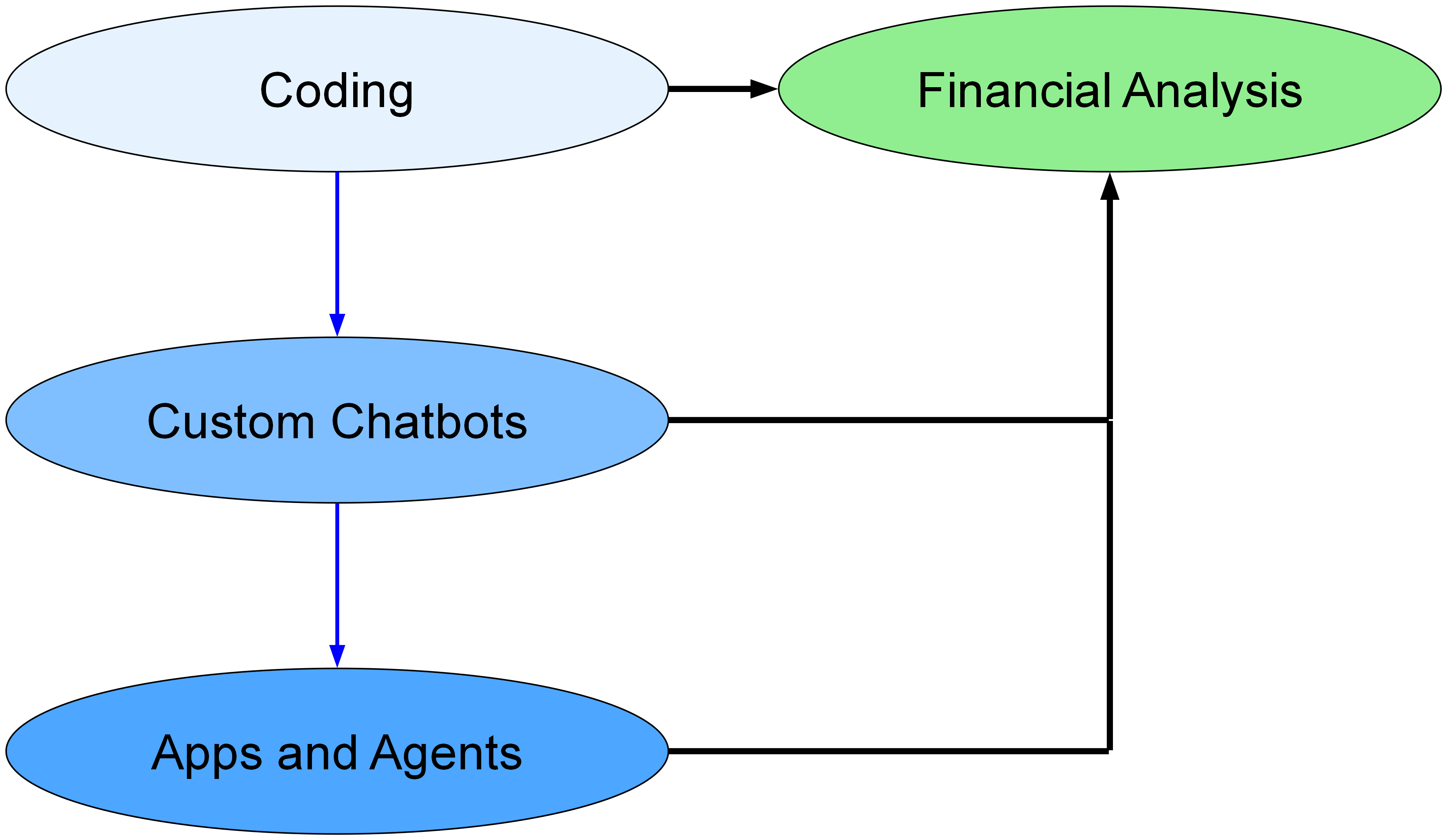
The learning/building progression is captured in the following diagram. Chatbots are a special type of app, and agents are chatbots with tools. AI can write the code to create these things, and there are also “no code” options available (Custom GPTs at OpenAI).
Tools
At this time, the best tool is Claude with a Pro account ($20/month). Claude Opus and Sonnet are the best coding LLMs. Also, Anthropic recently released Claude skills, which are the simplest way to add tools to a chatbot. Using a ‘Claude for Excel’ skill that Anthropic published, Claude can generate fully functioning, nicely formatted Excel workbooks. In addition, Anthropic created the Model Context Protocol (MCP) last year, which is a way to create apps as tools, and has recently made it simpler for users to configure MCP connections. Finally, the Pro subscription allows use of Claude Code, which is a very powerful coding agent.
Previously, I used Julius.ai instead of Claude. Julius provides access to Claude models, in addition to OpenAI models. It provides a 50% academic discount, which is an advantage, but it does not provide Excel generation or MCP connections. ChatGPT is another possibility. It has its Assistants API and Custom GPTs as an alternative to MCP connections. It can also generate Excel files, but in my experience Claude is currently doing a better job. Furthermore, ChatGPT provides only a limited (though standard) set of Python libraries, unlike Claude, which allows users to add whatever Python libraries (in the cloud for Claude Desktop or locally for Claude Code).
My view is that Claude Desktop is currently the best tool for finance courses that use AI, and Claude Code is best for a course on AI for finance.
Apps and Agents
Whatever code an LLM (large language model) writes for financial analysis can be encapsulated in an app. This has two important advantages. First, the app can be made broadly available, so people get the benefit of the code without needing to go to a chatbot to write it. Second, the code can be tested, confirmed, and frozen. This ensures that mistakes will not be introduced by rewriting the code each time it is needed.
MBA students need to understand that apps can be created to automate activities, and they need to understand about custom chatbots and AI agents. But, of course, they are not studying to become software engineers, so creating apps is a bit of a digression. Nevertheless, I think it is worth doing. Being able to automate routine tasks is a useful skill to have, and vibe coding makes it surprisingly easy. It also enables us to create concrete examples of custom chatbots and AI agents.
Deployment of apps is not difficult. The simplest method is to use Replit ($20/month) to create and deploy apps. The next simplest is to deploy Streamlit apps on Hugging Face Spaces (free). Streamlit Community Cloud is another alternative.1
See my blog post about apps or the discussion below.
1 Hugging Face Spaces and Streamlit Community Cloud are better for demonstration purposes than permanent deployment, because apps must be restarted by the app owner whenever they are unused for a day or so.
At this point, students will have seen financial analysis via:
- Using Excel
- vibe coding
- Creating and using an app
This provides the foundation for an informative class discussion about the relative merits of each approach and the circumstances in which one approach is better than another.
An AI agent is a chatbot that can use tools to complete tasks. Unlike regular chatbots that only generate text, agents can call functions, access APIs, and run applications to get things done.
We can create AI agents by creating MCP servers to perform whatever function we want. The AI will then use the server whenever we ask for that function. But in many cases we can now use the simpler Claude skills. Claude skills are instructions plus perhaps auxiliary objects such as Python scripts that Claude consults when needed. A skill can instruct Claude to always use a certain Python script to perform a function. The function is then performed by the Python interpreter rather than a stand-alone app or server. This makes Claude a true general purpose agent.
Extras
Introduction to Python
Students need to have some understanding of what they are seeing when an LLM generates code. I provide an optional pre-course workshop on using Jupyter notebooks in Google Colab, basic elements of Python, and pandas, numpy, and visualization libraries.
Database Chatbots
An example of a useful custom chatbot is one that converts natural language prompts into database queries and returns data. To demonstrate this, we first need to store a database online. We can use CRSP and/or Compustat data or other data for this example. An easy way to create an online database is to create an account at MotherDuck and use the MotherDuck CLI (command line interface) to upload csv files. A chatbot can tell you how to do this, or, there are agentic chatbots that can do it for you (see below). Then, we can ask Claude (or Replit) to create a chatbot that (i) sends a user prompt to an LLM, (ii) receives a response in the form of SQL code, (iii) sends the SQL code to MotherDuck to retrieve data, and (iv) returns the data to the user. This utilizes the duckdb Python library, which executes SQL queries against csv files and other types of files just as if a SQL database had been set up. To create the chatbot, a system prompt must be created that adequately describes the csv files to the LLM. This requires testing and iteration.
App Deployment
To permanently deploy an app, we need an account at a host. Koyeb is a good choice. Render is similar. A relatively simple way to deploy is to create a GitHub account. Then, we can
- Initialize a GitHub repository
- Push our code to GitHub
- Add a new Koyeb or Render service
- Connect the service to the GitHub repository
- Click ‘Deploy’ on Koyeb or Render
A chatbot can walk students through each step.
© Kerry Back
J. Howard Creekmore Professor of Finance and Professor of Economics
Rice University
kerryback.com